
AVD / Windows 365 Image Creation Hangs at "Waiting for Shutdown": Cause and Fix
Over the last two weeks, several customers have reported the same problem when creating images for Azure Virtual Desktop (AVD) and Windows 365 (W365) using Hydra for Azure Virtual Deskop. The image process starts normally, but at the end the temporary VM never powers off. The log keeps repeating the same informational message: "Waiting for shutdown". Hydra usually solves all sysprep issues automatically but now we got a new one, caused by an upgrade of Windows 11 from 23H2 to 25H2 before.
If that sounds familiar, the fix is quick.
Symptoms
- The imaging process runs from a golden master, but the temporary VM does not shut down.
- The log loops with "Waiting for shutdown" messages.
- The problem appears seemingly at random, on golden masters that worked before.
Cause
The issue shows up on golden masters that were upgraded in place to a newer Windows version, for example from an older 23H2 build to 25H2. Such an upgrade leaves markers in the registry that make Sysprep believe it is running on an upgraded OS.
In the Sysprep log (setupact.log) on the temporary VM, you will find:
- The message that Sysprep will run on an upgraded OS.
- A failing cleanup step (
Sysprep_Clean_Opk/RemoveUninstall) with error0x80070002when trying to clean upC:\Windows.old(Microsoft-Windows-Sysprep-SpOpk,Cleanup.xml).
Because Sysprep fails at that point, the VM never reaches the shutdown state, and the imaging process keeps waiting.
How to check
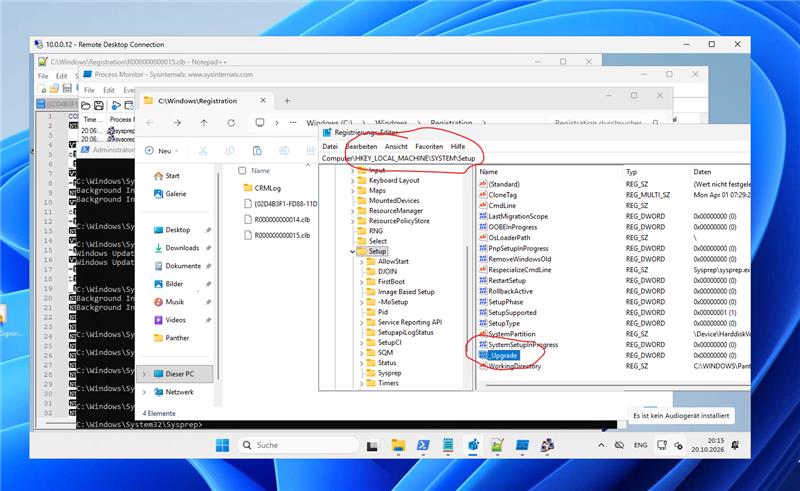
On your golden master, open regedit and navigate to:
HKEY_LOCAL_MACHINE\SYSTEM\Setup
Look for these entries:
UpgradeUpgradeComplete
If they exist, they are very likely the cause.
The fix
- Take a snapshot or backup of the golden master before changing anything.
- In
HKEY_LOCAL_MACHINE\SYSTEM\Setup, rename or delete theUpgradeandUpgradeCompletekeys. - Run the imaging process again.
In the cases we have seen, removing these keys resolved the issue immediately.
What about a permanent solution?
The next version of Hydra will handle this situation automatically, so you will not need to touch the registry yourself. Until then, the manual fix above works.
Summary
| Symptom | Temporary VM does not power off, "Waiting for shutdown" loops |
| Typical trigger | In-place upgrade of the golden master, e.g. 23H2 to 25H2 |
| Check | HKLM\SYSTEM\Setup contains Upgrade / UpgradeComplete |
| Fix | Rename or delete those keys, then re-run imaging |
AI Disclosure: This article was drafted with the assistance of Artificial Intelligence tools for linguistic refinement, structure, and text clarity in accordance with EU AI Act disclosure guidelines. All technical concepts, architectural evaluations, factual insights, and core content were independently curated and authored by the human author.