
Azure Virtual Desktop Hybrid Is Here: Bringing AVD to Your Datacenter
Azure Virtual Desktop (AVD) is central to Microsoft’s End User Computing (EUC) strategy. Until now, however, organizations evaluating AVD faced a fundamental architectural constraint: What if desktop workloads cannot, or should not, run directly in Azure regions?
With the General Availability (GA) of Azure Virtual Desktop Hybrid, that constraint disappears.
AVD Hybrid extends the AVD control plane beyond native Azure infrastructure, enabling session hosts to run on nearly any infrastructure within your own datacenter. For EUC architects, this means leveraging Azure’s cloud-managed control plane, broker, and user experience while keeping compute and data local.
AVD no longer mandates moving your desktop workloads to an Azure data center.
The Architecture: Control Plane in Azure, Workloads on-Premises
The core architectural principle of AVD Hybrid is straightforward: decouple management from compute.
Microsoft Responsibility (Azure Cloud): Microsoft manages the centralized Azure Virtual Desktop Control Plane hosted in Azure public regions. This layer handles:
- Connection Brokering & User Access: Managing user authentication, workspace presentation, and session routing via the Windows App / Remote Desktop client.
- Load Balancing: Distributing incoming user connections across available session hosts according to pool policies.
- Azure Arc Connection Management: Maintaining secure, outbound-only control-plane orchestration with your local infrastructure.
Customer Responsibility (On-Premises Datacenter): The customer maintains full operational ownership of the physical and virtual resources running in their datacenter. This layer encompasses:
- Virtual Machines & Compute: Provisioning, sizing, and maintaining the session host VMs on supported local hypervisors (e.g., Hyper-V, VMware, etc.).
- Lifecycle Management: Host deployment, patching, image maintenance, drain modes, and decommission processes.
- Infrastructure & Network: Operating the underlying host hardware, storage, active directory/identity integrations, and local network connectivity to backend systems.
(Operational management of these customer-managed tasks can be further streamlined using dedicated automation tools like Hydra, discussed later in this post.)
This separation allows enterprise teams to modernize their EUC management model and leverage cloud-native control without undergoing a forced, full-scale datacenter workload migration.
Why AVD Hybrid Matters for EUC Architects
Running desktops in Azure while accessing legacy on-premises backend data introduces latency, extra dependencies, and egress costs. AVD Hybrid places the compute layer next to your data.
- Low-Latency App Access - Near-zero latency to local DBs and backend services
- Regulatory Compliance - Guarantees data residency & strict on-prem isolation
- Infrastructure Continuity - Maximizes existing virtualization investments (Hyper-V, VMware, etc.)
- Incremental Migration - Avoids risky, all-or-nothing cloud shifts
But Why Not Just Use Azure Local?
That is a valid question. If your strategy and hardware alignment allow for it, Azure Local is a strong target architecture. However, if your goal is to leverage existing hardware and hypervisor investments (since Azure Local mandates specific certified hardware) AVD Hybrid becomes the far more practical choice. This also applies when organizations simply lack the timeline or bandwidth to execute a full Azure Local infrastructure project before modernizing their desktop layer.
This naturally leads to a broader question: Is AVD Hybrid just a transition technology?
I would argue that this is a fair assumption, but that doesn't make it the wrong choice. In fact, I distinctly recall discussing EUC itself as a "transition technology" back in the 2000s, yet here we are two decades later. Transition technologies often provide the bridge that enables real-world modernization at a manageable pace 😊.
AVD Deployment Matrix: Comparing Options
Selecting the right target host platform depends heavily on your existing operational dependencies and workload profiles:
| Dimension | AVD in Azure | AVD on Azure Local | AVD Hybrid |
|---|---|---|---|
| Control Plane | Azure Managed | Azure Managed | Azure Managed |
| Compute Location | Azure Public Cloud | On-Premises Azure Local Clusters | Existing On-Premises infrastructure |
| Prerequisite | Azure Subscription | Azure Local Hardware | Azure Arc |
| OS Support | Windows 10/11 Enterpise + Multi-Session, Windows Server | Windows 10/11 Enterpise + Multi-Session, Windows Server | Windows 10/11 Enterpise, Windows Server |
| Best For | Full cloud migration | Cloud migration | Leveraging existing hypervisors |
OS Limitation Note: Unlike native Azure or Azure Local deployments, AVD Hybrid does not support Windows 10/11 Enterprise multi-session. Deployments rely on Windows Server (for multi-session published apps/desktops) or standard single-session Enterprise client OS instances.
Technical Details: How AVD Hybrid Works Under the Hood
How does AVD Hybrid actually function from a technical perspective?
As highlighted earlier, the entire control plane remains hosted and managed by Microsoft in Azure. This introduces a major operational simplification: unlike a traditional Remote Desktop Services (RDS) environment, you no longer need to deploy, or maintain local Remote Desktop Web Access, Remote Desktop Gateway, or Remote Desktop Broker roles.
The Provisioning Process
From a deployment standpoint, the mechanism is straightforward:
- Azure Arc Onboarding: The base operating system (Windows Server or single-session Windows 10/11) is onboarded to Azure Arc by installing the Azure Connected Machine Agent.
- AVD Agent Deployment: Once Arc-enabled, the Azure Virtual Desktop Agent and AVD Bootloader are installed on the machine. This step can be triggered directly as an Azure Arc Extension from the Azure Portal or via infrastructure-as-code scripts.
- Host Pool Registration: The agent registers the local machine with its designated AVD host pool in Azure using an enrollment token.
Streamlining Deployment with Hydra
While manual or script-based extension deployment works for small environments, scale requires end-to-end automation.
Through Hydra for Azure Virtual Desktop (a management and automation platform I actively co-develop), this entire provisioning workflow is fully automated. Hydra can build session host VMs unattended directly on Hyper-V or vSphere from a golden image, automatically executing OS customization, Azure Arc onboarding, and AVD agent registration in a single seamless pipeline.
The RDS Evolution Advantage
Compared to a legacy native RDS environment, moving to AVD Hybrid immediately unlocks modern connection capabilities:
- Modern Protocol Stack & Performance: Benefit from continuous protocol innovations, including RDP Shortpath (UDP-based direct transport) for reduced connection latency.
- Forced Innovation: Instead of relying on static, version-bound RDS features tied to Windows Server release cycles, your connection architecture continuously leverages cloud-driven feature updates from Microsoft.
Licensing & Operational Realities
Licensing Alignment
AVD Hybrid introduces specific licensing considerations that must be factored into your total cost of ownership (TCO) evaluation:
- AVD Hybrid Service Fee (Microsoft): Per user fee, $X USD / user / month (not listed yet on aka.ms/AVDPricingPage).
- Note: Azure Local, AVD Hybrid pricing does not use a time-dependent, per-core infrastructure consumption model like Azure Local. It is licensed on a per-user basis.
- Windows Server Workloads: Supported via existing Remote Desktop Services (RDS) CALs with Software Assurance or RDS User Subscription Licenses.
- Client OS Workloads: Microsoft 365 E3/E5, A3/A5/Student Use Benefits, F3, Business Premium, Windows 11 E3/E5, Windows 11 A3/A5, or Windows 11 VDA E3/E5.
- Recommend: A good and affordable manamgement solution (see below)
Instead of introducing a brand-new licensing stack, architects can build a unified TCO comparison combining existing hypervisor, RDS, and Azure management components.
Closing the Management Gap with Hydra
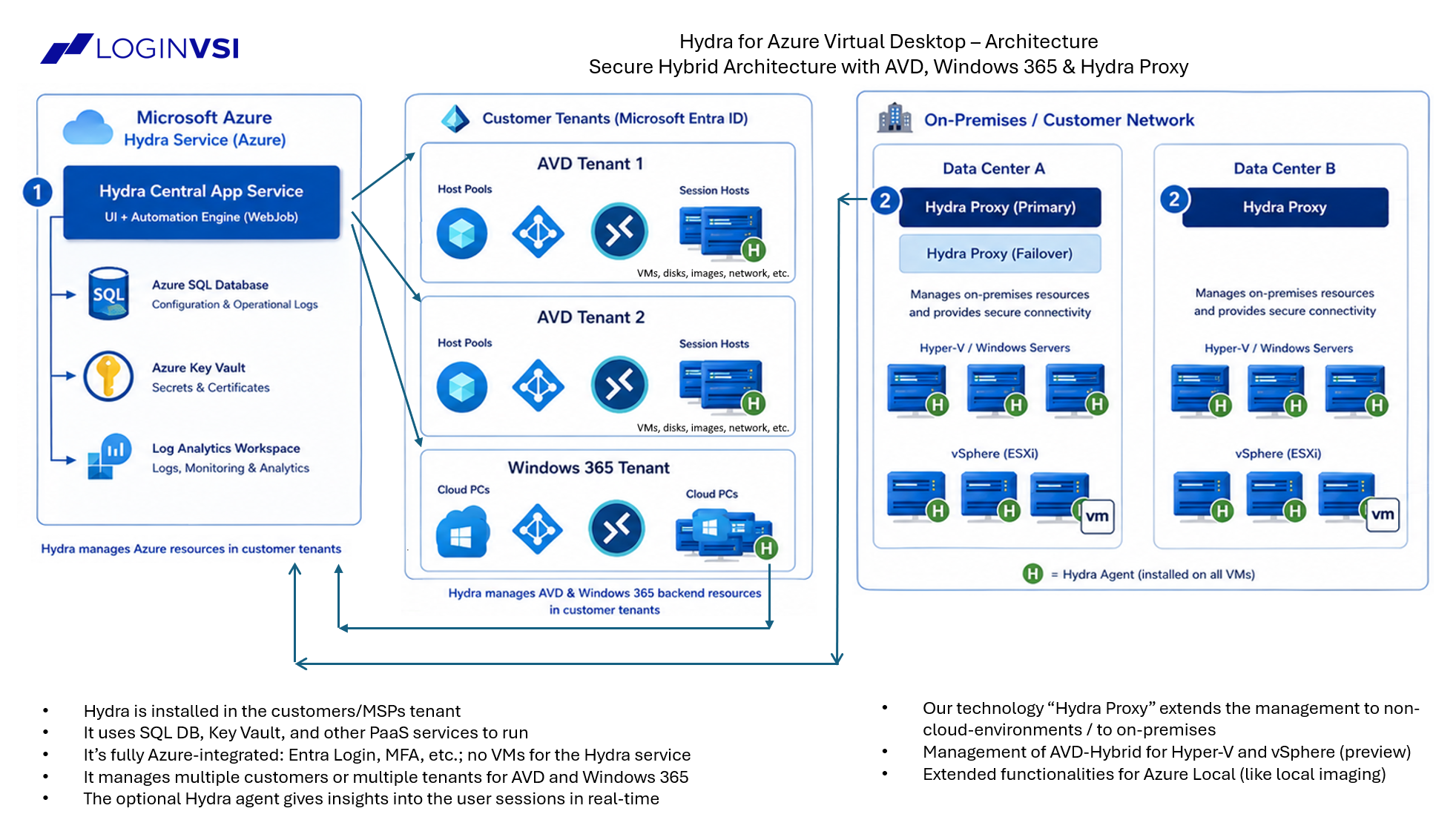
Because Microsoft does not manage on-premises power management, image distribution, or host lifecycle, enterprise environments require dedicated automation.
This is where Hydra for Azure Virtual Desktop provides immediate value.
| Layer | Architecture Scope | Key Functions |
|---|---|---|
| Layer 1: Service Plane | Microsoft Managed (Azure Cloud) | User Access, Brokering, Load-Balancing, Connection Gateway |
| Layer 2: Automation Plane | Hydra Management Layer | Automated Provisioning, Image Deployment, Autoscaling (if needed), Host Self-Service, Other Automations like Lifecycle-Management |
| Layer 3: Infrastructure Plane | Customer Managed (Datacenter) | Hyper-V / VMware Hypervisors, Azure Arc Connected VMs, Storage & Local Network |
Hydra sits side-by-side with the Azure management plane and your local infrastructure layer to automate:
- Host Provisioning & Image Management: Standardizing local golden image deployment.
- Advanced Autoscaling: Scaling compute based on active user demand to minimize local host resource consumption.
- Session Host Lifecycle: Start, stop, delete, create, and patch cycles on-premises.
- Management: One UI to manage Azure Virtual Desktop in any environments.
- User Management: First-choice platform for the helpdesk.
- Self-Service: For end users
- And much more...
With Hydra’s GA support for AVD Hybrid on Hyper-V, vSphere (and expanding supported platforms), architects get end-to-end automation across both cloud and local AVD host pools from a single management layer.
Final Takeaway: Separation of Control and Compute
AVD Hybrid fundamentally changes the EUC evaluation matrix. It separates two critical architectural decisions:
- Which EUC control plane do we standardize on? (Azure Virtual Desktop)
- Where should individual desktop workloads execute? (Azure, Azure Local, or Existing Datacenter)
By decoupling these decisions, Microsoft gives EUC architects unprecedented freedom to modernize management platforms at their own pace without stranding legacy infrastructure investments.
Key References & Related Links
Microsoft Documentation & Announcements:
- Azure Virtual Desktop Hybrid Announcement – Official Announcement from September, 1st 2026.
- Azure Virtual Desktop Overview – Official Microsoft Learn portal for Azure Virtual Desktop.
- Azure Arc Documentation – Overview of managing hybrid and multicloud infrastructure with Azure Arc.
- Azure Virtual Desktop Prerequisites & Supported OS – Detailed operating system and architecture requirements.
- Azure Virtual Desktop Licensing – Details on AVD pricings.
Login VSI & Hydra Resources:
- Hydra for Azure Virtual Desktop – Product overview for automated management, image deployment, and autoscaling.
- Login VSI Official Website – End-to-end EUC performance validation, management, and automation solutions.
AI Disclosure: This article was drafted with the assistance of Artificial Intelligence tools for linguistic refinement, structure, and text clarity in accordance with EU AI Act disclosure guidelines. All technical concepts, architectural evaluations, factual insights, and core content were independently curated and authored by the human author.